We independently review everything we recommend. When you buy through our links, we may earn a commission. As an Amazon Associate we earn from qualifying purchases.
5 Best Affordable Business SSD Laptops (November 2026)
Compare five affordable business laptops with fast SSD storage, strong everyday performance, and practical office features for work and study.
Compare five affordable business laptops with fast SSD storage, strong everyday performance, and practical office features for work and study.
An affordable business laptop with an SSD is not really a choice between speed and saving money. It is a choice between a machine that starts quickly, opens documents without delay, and keeps several office applications running at once, and a machine that looks adequate on paper but slows down during a normal working day. The SSD matters because it removes the waiting that used to come from a spinning hard drive, yet the processor, memory, screen, keyboard, and ports decide whether that speed turns into comfortable work or only a faster start followed by the same old friction.
This guide is for office workers, small business owners, remote workers, and students who need a dependable laptop for documents, spreadsheets, email, video calls, and browser-based tools. The five laptops below were chosen from the names and specifications shown on their Amazon product pages, with attention to SSD storage, memory, processor, display, connectivity, and the practical details that shape a working day.
Quick Picks
As an Amazon Associate we earn from qualifying purchases
Product
Best for
Key spec from title
Lenovo V-Series V15 Business Laptop
Heavy multitasking with a full number pad
AMD Ryzen 7 7730U, 16GB RAM, 512GB SSD
HP 255 G10 Business Laptop
Office work with Windows 11 Pro and Wi-Fi 6
AMD Ryzen 7 7730U, 16GB RAM, 512GB PCIe SSD
Acer Aspire 15.6-Inch Laptop
Bright, clear everyday work on a Full HD IPS screen
AMD Ryzen 5 7520U, 16GB RAM, 512GB PCIe SSD
ASUS Vivobook Go 15 Laptop
Light, straightforward work with a slim 15.6-inch display
AMD Ryzen 5 7520U, 16GB LPDDR5, 512GB SSD
HP 255 G10 Laptop, Ryzen 5 Edition
A lower-cost entry point for basic business tasks
AMD Ryzen 5 7530U, 8GB RAM, 256GB SSD
How to Choose
Match the processor to the working day
A business laptop processor should be judged by the work it will do every day, not by a single number in a title. A Ryzen 7 or a modern multi-core Ryzen 5 handles documents, spreadsheets, email, video calls, and a dozen browser tabs with room to spare. Look for the core count and the maximum boost speed on the Amazon product page, then think about the heaviest moment in a normal day, such as a video call running beside a spreadsheet and a shared drive. If that moment is common, choose the stronger processor. If the day is mostly writing and email, a modest processor leaves more room in the budget for memory and storage.
Treat 16GB of memory as the comfortable baseline
Memory decides how smoothly a laptop switches between applications, and 16GB is the comfortable baseline for most business use in this group. With 16GB, a worker can keep email open, edit a document, check a spreadsheet, and join a call without closing something first. An 8GB laptop can still work well for focused tasks, such as writing, invoicing, or working in one or two applications at a time, but it needs more discipline about open tabs and background programs. Check whether the memory type is DDR4, DDR5, or LPDDR5 on the product page, and remember that soldered memory cannot be changed later, so the amount chosen at purchase is the amount kept for the life of the machine.
Choose SSD size by the files kept on the machine
A 512GB SSD suits most business users because it leaves room for the operating system, office software, documents, presentations, photos, and a growing archive of client files. A 256GB SSD works when most files live in cloud storage, email attachments are cleaned out regularly, and large media libraries are kept elsewhere. The risk with a smaller drive is not a single day of work but the slow accumulation of downloads, updates, and project folders over months. Before choosing, count the folders that must stay local, including offline documents, presentation assets, and any software that stores data on the machine. If that total is already close to the drive size, move up to 512GB.
Check the screen, keyboard, and ports before deciding
A business laptop is used for hours at a time, so the screen, keyboard, and ports deserve as much attention as the processor. A 15.6-inch Full HD display with 1920 by 1080 resolution keeps text sharp and spreadsheets readable, while an IPS panel helps when the screen is viewed from an angle during a meeting. A numeric keypad speeds up invoicing and data entry, and a webcam matters for anyone who joins video calls from home or a small office. For ports, look for HDMI for an external monitor, USB-C for modern accessories, USB-A for older devices, and RJ45 Ethernet where a wired office connection is still used. Missing one may mean an adapter every day.
The 5 Best Options
Lenovo V-Series V15 Business Laptop
Top Pick
Lenovo V-Series V15 Business Laptop
Best for: Office workers who juggle spreadsheets, email, calls, and documents on one machine.
Display: 15.6-inch Full HD display
Processor: AMD Ryzen 7 7730U, 8 cores, 16 threads, up to 4.5 GHz maximum turbo frequency
The Lenovo V-Series V15 is the strongest all-round choice in this group for buyers who want a capable processor, generous memory, and a full-size working layout in one affordable business laptop. Its Ryzen 7 processor suits multitasking, large spreadsheets, and long days with several applications open, while the 512GB SSD gives documents, software, and project files room to grow. The numeric keypad is a practical advantage for invoicing, accounting, and data entry, and the combination of HDMI and RJ45 Ethernet makes it easy to connect to an office monitor and a wired network without extra adapters.
HP 255 G10 Business Laptop
Runner-Up
HP 255 G10 Business Laptop
Best for: Small business owners who need Windows 11 Pro and a dependable daily office machine.
Display: 15.6-inch Full HD display
Processor: AMD Ryzen 7 7730U, 8 cores, 16 threads, up to 4.5 GHz maximum turbo frequency
The HP 255 G10 with a Ryzen 7 processor is a solid office laptop for buyers who want Windows 11 Pro, fast wireless connectivity, and a familiar 15.6-inch layout. Its processor and 16GB of memory handle everyday business software with ease, and the 512GB PCIe SSD keeps start-up, file opening, and application switching quick. Wi-Fi 6 helps in busy offices and shared workspaces where several devices compete for the same network, and the numeric keypad supports fast number entry. This is a practical pick for a home office, a small business desk, or a shared workstation that serves more than one person during the day.
Acer Aspire 15.6-Inch Laptop
Acer Aspire 15.6-Inch Laptop
Best for: Remote workers and students who want a clear screen and balanced everyday performance.
Display: 15.6-inch Full HD IPS display, 1920 by 1080 resolution
Processor: AMD Ryzen 5 7520U, 4 cores, up to 4.3 GHz
The Acer Aspire 15.6-inch laptop stands out in this group for its Full HD IPS display, which keeps text clear and colours consistent when the screen is viewed from different angles. Its Ryzen 5 processor, 16GB of DDR5 memory, and 512GB PCIe SSD form a balanced combination for documents, browser-based tools, video calls, and everyday multitasking. The HD 720p webcam supports remote meetings, Wi-Fi 6 supports modern office networks, and the silver finish gives the machine a clean, professional look. It is a good fit for buyers who spend most of the day reading, writing, and working in cloud applications.
ASUS Vivobook Go 15 Laptop
ASUS Vivobook Go 15 Laptop
Best for: Buyers who want a slim, simple laptop for writing, email, and online work.
Display: 15.6-inch Full HD IPS display
Processor: AMD Ryzen 5 7520U, 4 cores, up to 4.3 GHz
The ASUS Vivobook Go 15 is the most straightforward pick in this group for buyers who want a slim, light-feeling 15.6-inch laptop without paying for features they will rarely use. Its Ryzen 5 processor and 16GB of LPDDR5 memory cover documents, email, browsing, and video calls, while the 512GB NVMe SSD provides fast storage for files and software. The Full HD IPS display keeps everyday work readable, and the integrated Radeon graphics handle normal office visuals and media playback. This model is best understood as a focused work laptop: it does the common tasks well and stays out of the way.
HP 255 G10 Laptop, Ryzen 5 Edition
HP 255 G10 Laptop, Ryzen 5 Edition
Best for: Budget-conscious buyers with focused tasks and most files stored in the cloud.
Display: 15.6-inch Full HD display
Processor: AMD Ryzen 5 7530U, 6 cores, 12 threads, up to 4.5 GHz boost clock
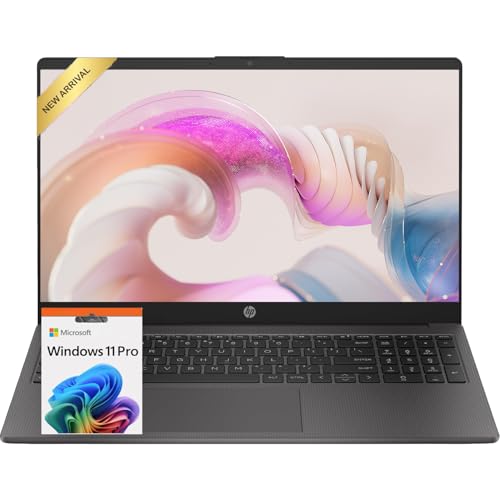
The HP 255 G10 in this Ryzen 5 edition is the entry-level option in this group, and it makes sense for buyers whose work is focused rather than heavy. Its six-core Ryzen 5 processor handles writing, invoicing, email, and video calls, while Windows 11 Pro adds business features that some workplaces require. The 256GB PCIe SSD is the main compromise, so this laptop suits buyers who store most files in the cloud, keep local folders tidy, and do not need a large media library on the machine. USB-C adds a modern connection for accessories and displays, and the Full HD screen keeps documents easy to read.
Which One Fits Your Situation
You run several applications at once all day
Choose the Lenovo V-Series V15. Its Ryzen 7 processor and 16GB of memory are the strongest combination here for keeping documents, spreadsheets, email, and video calls open together. The numeric keypad and the HDMI and RJ45 connections also suit a fixed office desk, where the laptop connects to a monitor and a wired network each morning.
You need Windows 11 Pro for a small business
Choose the HP 255 G10 with the Ryzen 7 processor. It pairs Windows 11 Pro with 16GB of memory, a 512GB PCIe SSD, and Wi-Fi 6, which covers the main needs of a small business desk. The full-size keyboard and numeric keypad support invoicing and data entry, and the larger SSD leaves room for client files and software.
You work mostly in documents and cloud applications
Choose the Acer Aspire 15.6-inch laptop. Its Full HD IPS display is easy on the eyes during long reading and writing sessions, and its Ryzen 5 processor, 16GB of DDR5 memory, and 512GB SSD handle cloud tools, email, and video calls without fuss. It is a balanced choice when screen clarity matters more than maximum processor power.
You want the lowest-cost way into a business SSD laptop
Choose the HP 255 G10 Ryzen 5 edition, but only after checking storage. Its 256GB SSD and 8GB of memory are enough for focused work, cloud storage, and a tidy set of local files, and Windows 11 Pro keeps it suitable for business use. If local files are already growing, move up to one of the 512GB models instead of trying to manage a full drive later.
Common Mistakes
Choosing a laptop by SSD size alone and ignoring memory, because 8GB of memory can slow multitasking even when the drive is fast.
Buying a 256GB SSD without checking how many files must stay on the machine, then running out of room after a few months of downloads and updates.
Assuming every model with the same name has the same specification, when similar laptops are sold with different processors, memory, and storage.
Overlooking the operating system edition, especially when a workplace needs Windows 11 Pro rather than Windows 11 Home.
Forgetting to check ports and wireless standards, then discovering that a monitor, wired network, or older accessory needs an adapter every day.
Frequently Asked Questions
Is a 512GB SSD enough for business use?
A 512GB SSD is enough for most business users because it leaves room for the operating system, office software, documents, presentations, and a growing archive of client files. It also allows room for updates and temporary files without constant cleaning. Buyers who store large video libraries or extensive design files locally may need more, but for documents, spreadsheets, email, and cloud-based work, 512GB is a comfortable size.
Is 8GB of memory enough for an affordable business laptop?
An 8GB laptop can work well for focused tasks such as writing, invoicing, email, and working in one or two applications at a time. It becomes less comfortable when many browser tabs, a video call, a spreadsheet, and a document are open together. For that kind of multitasking, 16GB is the safer choice, and it is worth choosing when the budget allows, especially when the memory cannot be changed later.
Does Windows 11 Pro matter for a small business laptop?
Windows 11 Pro matters when a workplace needs business features such as advanced security controls, remote desktop access, or joining a company domain. For independent work, study, and basic office tasks, Windows 11 Home covers the usual needs. Before choosing, check what the employer, client, or IT setup requires, because the edition is tied to the machine and is not a detail to fix after purchase.
Should I choose a Ryzen 5 or a Ryzen 7 processor?
Choose a Ryzen 7 when the working day involves several applications at once, large spreadsheets, or frequent video calls beside other work. Choose a Ryzen 5 when the day is mostly writing, email, browsing, and cloud applications, and the saving can go toward memory or storage. Both handle normal business work, so follow the heaviest part of the day.
C
Carros Editorial Team
We compare specs, materials and verified owner reviews before a product earns a spot. Rankings are never paid.
Affiliate disclosure. As an Amazon Associate we earn from qualifying purchases at no extra cost to you. Prices accurate as of the date shown.
Compare the best outdoor wood burning fire pits by size, material and airflow design, with page-stated specs to help you choose the right pit for your yard.
The best rechargeable CR123A batteries compared by chemistry, voltage and charger: SureFire LiFePO4, Tenergy and Nitecore RCR123A cells, plus the safety checks that matter first.
The best batteries for the Traxxas 1/16 E-Revo VXL compared: Traxxas Series 1 NiMH, HRB and Gens ace 2S 2200mAh LiPo packs, fit, connectors, parallel running, and charging safety.
How to choose a 510 thread battery for Brass Knuckles vape cartridges: voltage ranges, draw vs button activation, cartridge fit, charging, and safety checks explained.
How to pick a stereo keyboard amplifier with balanced line outputs, from power and speaker size to XLR outs, stereo linking, and the five models that set the standard.
A radial drill press swings its head out from the column to reach wide boards and off-centre holes. Learn how swing, spindle travel, speeds and chuck size decide the right machine.
Diamond-frame commuter e-bikes explained: fit, motor feel, battery range, and the equipment that makes a daily ride work, plus the mistakes to avoid before buying.
Find the best tablets under 125 for streaming, reading, school and family use. Compare five budget tablets with strong battery life and sharp displays.


 ASUS Vivobook Go 15 Laptop
 HP 255 G10 Laptop, Ryzen 5 Edition